Breaking

Thursday, 31 January 2019

January 31, 2019

Samsung M10, M 20

  Hello friends how are you. Today we talk       about Samsung M series new phones M 10     M 20. Hello i am Yash You are reading  Techincal Yash so let's start the blog...

South Korean tech giant Samsung makes some impressive smartphones in the premium category. However, the same doesn’t hold true when it comes to the budget segment. Samsung, for a long time, has sold smartphones with lackluster hardware in this category in India which resulted in the company losing its number one position to China’s Xiaomi. Well, to regain lost ground, Samsung has come up with the Galaxy M series, under which the company has today launched the Samsung Galaxy M10 smartphone in India.


The Samsung Galaxy M10 is powered by the company’s homegrown Exynos 7870 SoC which is mated to 3 GB RAM. However, there’s also a variant which comes with 2 GB RAM. On the software side of things, the smartphone runs Android 8.1 Oreo which is layered with Samsung Experience 9.5 custom UI atop.


On the front, the Galaxy M10 sports a 6.2-inch Infinity-V display that comes with a notch having the shape of the letter ‘V’. The screen has a resolution of 1480 x 720 pixels and a pixel density of 270 ppi. The back of the Galaxy M10 is covered with plastic, but, it does have a glossy finish. It’s also home to dual cameras and a speaker located in the bottom-left corner.


The dual camera setup on the Samsung Galaxy M10 is a combination of one 13 MP camera and one 5 MP camera – the former has f/1.9 aperture with the latter having f/2.2 aperture. For selfies and video calls, there’s a 5 MP snapper on the front with f/2.0 aperture.
The Samsung Galaxy M10 is offered in Charcoal Black and Ocean Blue colors, and it ships with a 3400 mAh battery that keeps the lights on.

Samsung Galaxy M10 Specifications

  • CPU: 1.6 GHz Exynos 7870 octa-core processor
  • RAM: 2/3 GB LPDDR3
  • Operating System: Samsung Experience 9.5 based on Android 8.1 Oreo
  • Display: 6.2-inch HD+ (1480 x 720 pixels) Infinity-V Display with 270 ppi pixel density and Dragontrail Glass
  • Rear Camera: 13 MP (f/1.9 aperture, 1.12 μm pixel size) + 5 MP (f/2.2 aperture, ultra-wide angle) with LED flash
  • Front Camera: 5 MP with f/2.0 aperture
  • Internal Storage: 16 GB (with 2 GB RAM), 32 GB (with 3 GB RAM)
  • External Storage: Expandable via microSD card (dedicated slot)
  • SIM: Dual
  • Connectivity: Dual 4G VoLTE, GPS, Bluetooth, Wi-Fi, 3.5 mm headphone jack, micro USB
  • Other: Face Unlock, Widevine L1 certification
  • Colors: Charcoal Black, Ocean Blue
  • Battery: 3400 mAh

Samsung Galaxy M10 Price in India and Availability

  • Price of 2 GB RAM + 16 GB storage variant: ₹7990
  • Price of 3 GB RAM + 32 GB storage variant: ₹8990
  • Availability: To be available exclusively on as well as through Samsung India’s from February 5..
Thanks for reading.....


Tuesday, 29 January 2019

January 29, 2019

How to record call in What's App... ?

 Hello friends how are you. Today i take aime sifferdif topic What's App. That how to record calls in What's App hello I am Yash you are reading my blog Techincal Yash so let start....


Recording phone calls is relatively straightforward and that got us thinking — how to record WhatsApp calls? We all make several WhatsApp calls throughout the day because these are more reliable than phone calls (thanks to frequent call drops). As journalists, recording phone calls is essential for us especially when we're interviewing people over the phone so figuring out how to record WhatsApp calls is important for us. Let's cut to the chase: recording WhatsApp calls is far from straightforward. In fact, despite the hours we poured into researching this, we didn't find an easy method to get this done. We checked how to record WhatsApp calls across platforms, but hardware limitations and software restrictions got in the way.
If you would still like to do so — you're here after all — know that recording WhatsApp voice calls is a troublesome affair. Don't even get us started on WhatsApp video calls, as it's essentially out of the question.
There are two ways to go about recording WhatsApp calls on Androidand iOS, and both have a similar issue: they won't work for many because you need specific devices. Before you follow these steps, please always take permission from all people on the call before recording WhatsApp calls, and make sure that recording calls is legal where you live.

How to record WhatsApp calls on Android/ iPhone using a Mac and iPhone

The easiest way to record a WhatsApp voice call requires both a Mac and an iPhone. That's a big kicker, isn't it? Moreover, the iPhone cannot be your primary device. You will need a second phone — any platform that supports WhatsApp group voice calls — that has your WhatsApp account. In the instructions below, we will refer to the recording iPhone as 'the iPhone', and the phone you'll be calling from as 'your phone'.
Here's how to record WhatsApp calls:
  1. Connect the iPhone to a Mac with a lightning cable.
  2. Select 'Trust this computer' on the iPhone, if this is the first time you're connecting the two.
  3. Open QuickTime on the Mac.
  4. Under File, choose New Audio Recording.
  5. Next to the record button in QuickTime, click the arrow pointing downwards and choose the iPhone.
  6. Hit the record button in QuickTime.
  7. Using the iPhone, call your phone via WhatsApp.
  8. Once you're connected, hit the add user icon. Then select the person you want to talk to. This will begin your conversation with the person whose call you want to record.
  9. Disconnect the call once it's complete.
  10. Stop the recording in QuickTime and save the file on the Mac.
All participants of a WhatsApp group voice call can see all other parties, which means there's no way to secretly record a WhatsApp call without them finding out. In any case, you shouldn't be trying to hide the fact that you're going to be recording the conversation in the first place, as we said befor

How to record WhatsApp calls on Android using Cube Call Recorder
Remember how we said that both methods only work with specific devices? Due to hardware differences and software limitations, Cube Call Recorder's VoIP recording feature — WhatsApp uses VoIP, that's Voice over Internet Protocol — only works on certain devices. The list is available as a Google Spreadsheet linked from the app's Play Store page. There's another caveat with Cube Call: VoIP recording mostly works on the listed devices. We tested Cube Call with Samsung Galaxy Note8, which is present in the list, but it didn't work for us despite repeated attempts and tweaks to app settings.
If you have a device that's listed in that aforementioned spreadsheet, you're welcome to try these steps.
  1. Install Cube Call Recorder on your phone that has WhatsApp.
  2. Open Cube Call Recorder and then switch to WhatsApp.
  3. Call the person you want to talk to.
  4. If the Cube Call widget shows and lights up while you're talking, it's working.
  5. If it gives you an error, open Cube Call Recorder settings and choose Force VoIP call as voice call.
  6. Call again and see if it the Cube Call Recorder widget shows and lights up.
  7. If it gives you an error again, then unfortunately it won't work on your phone.

How to record WhatsApp calls on Android (alternative method)

Android users have a third option: root your device. We don't recommend this as it comprises your phone's security and might push you off the manufacturer's update track, but if you must, then go ahead root your phone and use the SCR Screen Recorder app, available via XDA.
As we said before, recording WhatsApp calls is fairly complicated. If neither of those methods work for you, you can always keep your phone on speaker and record the call via a second phone or any device which has a voice recorder placed nearby, all while you sit in a quiet room. That's a crude hack and the only reason we have to mention it here is that it's the only reliable method of recording WhatsApp calls at a really low cost

Friday, 25 January 2019

Wednesday, 23 January 2019

January 23, 2019

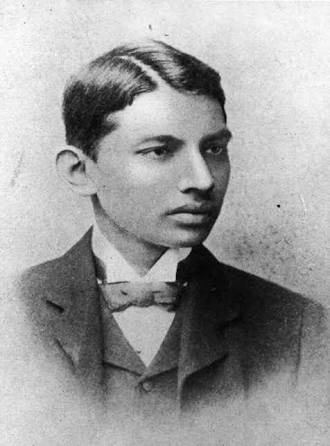
Mahatma Gandhi Information.......

Hello friends how are you. Today i tell something about ' Mahatma Gandhi's. Hello I am Yash so let's start.....👇👇👇....

The name of Mahatma Gandhi is well known to evenr indian, all politicians, statements and thinkers revolution around the world and many peoples in many many countries.  It is not pozpossi to think of Indians struggle for freedom without acknowledging his understand his all around greatness......


Gandhiji was born on 2 October in the year 1869 A.D. in the town of por Bandar which is in Gujrat state. His father was ' Karamchand who name him as Mohandas. After completing school education his wise father sent him England for education in legal field. But his devote mother made him to solemnly promise that he will never take non- veg food and liquor during his bolatat stay. At the time England was called Bolatat and every aspiring young man going to England started talking non-veg and liquor as new liberated way of life. Mohan gave his words and stri k to it during his life time. He had gone to study law he become a student of inner temple and became Bar-At-Law ( BARRISTER) from that prestigious institute. He had a triumphant return and was welcome in his family.


Mohandas Gandhi started his legal practice in Gujrat but he was drawn to South Africa. At this time I.e at the end of nineteenth century thousands of Gujarati families had gone to Africa and settled there. Their main occupation was commerce. They were in a need of legal advisor who will do the job of both solicitor and advocate. So it came about that he landed in S.A. and was busy in legal matters. At that time he moved about in woh fashion and moved about in five price suit! According to his social position he was one day travelling by railways and had purchased the first class ticket. Then one incident happened at Moritzverg station which changes his entire life and the future of India. When he entered the compartment there were only Europeans in the coach. He sat on one seat Nutan arrogant Englishman told him ' Sami, You near my feet on the floor. These sofas to his seat and refused to vacate event when other passengers tried to pull him. He was taken out of the platform and he was 'lynched'.  This is the exact word used in Gandhi's autobiography.

Afterwards, other Indians met him and told him their grievances. It become clear that all were suffering from Racial discrimination. There were Indians and dogs were not allowed.

He organised all Indians and and told them that we will resists such treatments but there will.be no violence and no use of weapons. Our shield is none violence and we will go and buy the civil disobedence. This a new Gandhi philosophy was born. After some year he returned to India.

The tide of his fame had reached Indians shores even before he landed. The populace welcomed him and started expecting guidance.

At the time of lokmanya tilak and Gopal krishan Gokhale dominated congress and Mumbai was a stronghold. Gandhi Ji became a disciple of Gokhale and followed his non volience way. Tilak era was coming to close due to his illnes. In this year 1919 there was agitation against Rawlett act and next year there was campaign of civil dosobedence. Along with the political along the activities, Gandhiji was very much involved in the efforts of Hindu Muslim unity for uplift of harrijan. Lord curzon had sown poison of religious division by proposing division of Bengal providence on the basis of population Hindu and muslim. So it was uphill task to reunite them......


Thanks for watching......👆👆👆

If you don't see my YouTube video so please see.. About how to great wishing script on android........👇👇👇


If there is any mistake so please sorry.....

Please subscribe my channel and like the video please........ease share this blog to your friends......

Thanks very much

Wednesday, 9 January 2019

January 09, 2019

How to speed up android phone internet.... ?

Hello friends how are you. Today i tell you that how to speed up android phone internet with some setting in your phone's setting app. Hello I am Yash You are reading Techincal Yash so let's start....


Hello friends you all know that most of the people use internet in their samart phones.In the world there are many many network companies but sometimes when you use internet your internet works slow or sometimes fast but when our internet works slow what can we do.... ? Today i tell you some steps please follow this steps to  speed up your internet connection. This setting can't work in all smart phones. If we complect 100 views in this post i tell you a pro trick about how to speed up android phone internet... So please share this post....

Hello friends now i tell you some setting's please follow it carefully..... 

1. Please open your phone's setting app.

2. Please open sim-card and mobile network.

3. Thee select from which sim-card you use your phone internet. If you use only single sim click your sim card name.

4. Then click on Asses pointer name.

5. Then you see ' Reset to default' / or you see there dots in right side in the top.

6. Please click on 'Reset to default'.

7. Click 3 or 4 times on ' Reset to default'.

8. Then please turn off your phone's data connection (internet).

9. Then turn on  your phone's data connection (internet) again.

10. Then enjoy your phone's internet.

Note:- If this setting is not working in your phone i search some tricks for you that setting work in all phones. If we complect 100 views on this post i tell more tricks, how to use full speed internet in any smartphone. So please share this blog to complete 100 views in this post...

If you don't see my last post about internet is free to all and how to internet comes in your phone so please see 👇👇👇

https://techinicalyash.blogspot.com/2018/12/internet-is-free-to-all.html?m=1

Happy Makar Sankranti

Happy Makar Sankranti Special surprise for you....👇👇👇

https://happy12makarsankranti2019.blogspot.com/?m=1

Please see my Makar Sankranti post...👇👇

https://techinicalyash.blogspot.com/2019/01/the-kite-festival.html?m=1

Thanks for watching


Happy Makar Sankranti ina advance.....

Please share to your whats app group so we complect 100 views then I tell you how to speed up android phone internet in all phones .......

🙏🙏Thanks 🙏🙏....

Please Share......